Know who's at the gate before the car stops.
CheckpointVista recognizes returning visitors by face and license plate using the cameras your sites already have. Gate officers confirm a known guest in a tap or two, and every entry is on record.

Demo screen with sample people. Match scores are simulated.
- Works with the cameras you already have
- Runs on iPad, phone or desktop
- The officer always makes the call
- Online guest portal for residents
Most visitors have been here before. Now the gate knows it.
Guards still type names, copy plates and search paper lists for people who visit every week. CheckpointVista does the looking up so the officer can focus on the person in the car.
Car arrives
The site's existing camera sees the driver and the plate.
Snapshot
Images are sent securely to CheckpointVista in seconds.
Face and plate matched
Compared against that community's known visitors and guest lists.
Officer confirms
Checks the match, the unit (usually already selected) and any alerts, then approves or denies.
Visit on record
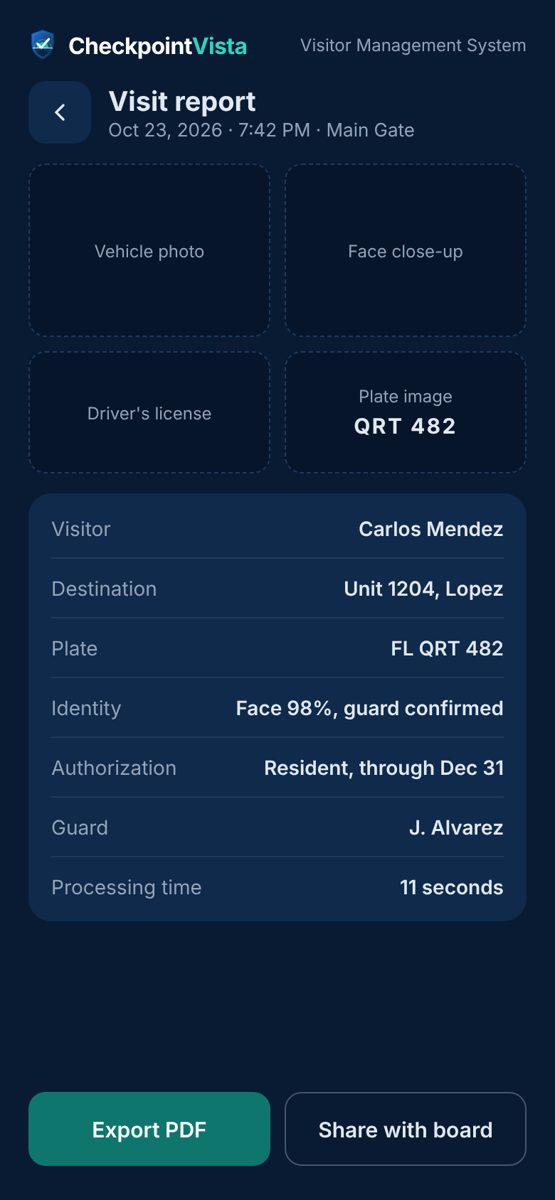
Photo, plate, license, time and decision, searchable later.
One system for the gate, the residents and the office.
Guard station
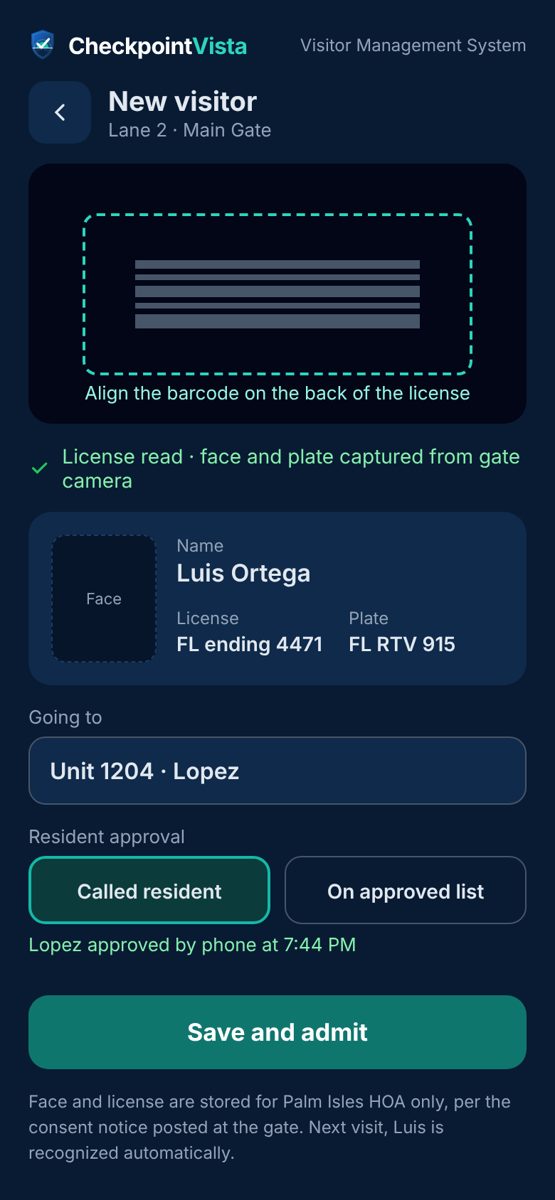
A clear arrival card on the post tablet or phone. Known visitors show up with their name, history and the unit they usually visit already selected.
- Face and plate matches for the officer to confirm
- Driver's license read from the barcode on the back
- VIP, watch-list and expired-license alerts before the decision
- Manual search and a backup path when the internet drops
Online guest portal
Residents keep their own guest lists from any browser, and management can see every unit's list. The officer sees "on guest list" right on the arrival card.
- Permanent, temporary, vendor and event guests
- Upload a party list in one paste
- Email or text alerts when guests arrive
- Household "do not admit" lists, set by the resident
Management reporting
Visit logs, busiest hours and days, and a one-page report for any entry, ready for the board.
Search everything
Find any visit by name, plate, unit or date in seconds instead of flipping through logbooks.
License barcode reader
Reads the back of a driver's license so new visitors are added in under a minute.
Watch lists
Board-approved "do not admit" and watch entries appear before the officer decides.
Uses your cameras
Connects to the gate cameras and recorders your sites already use. A small program on the gatehouse computer sends the snapshots; no new cameras needed.
Shared post devices
Officers sign in individually on the shared tablet, so every decision is tied to a name.
Built to support people, not replace them.
Recognition only suggests a match. The officer decides every entry, and each community controls its own data.
The officer decides
CheckpointVista never admits or turns away anyone on its own. It shows the match and the alerts; a person makes the call. Where a site connects its gate opener, the gate opens only after an officer approves.
Consent at enrollment
A visitor's face is saved for faster entry only when the visitor agrees and the officer records it. Each site can switch face recognition off; plate recognition keeps working.
Kept separate
Each community's photos and records are kept apart from every other client's, and everything travels over encrypted connections.
Kept only as long as needed
Gate snapshots delete automatically on each client's schedule, and only the last four digits of a license number are stored.
Give your clients a modern gate without new equipment.
Built by security people for the guard companies that protect HOAs, condominiums and gated communities.
Shorter lines
Regulars are confirmed in seconds, so the queue at the gate moves.
Fewer mistakes
No mistyped plates or missed names when the post gets busy.
Proof for every entry
Answer board and resident questions with a photo-backed record.
A service clients notice
The resident portal shows your value every time a guest arrives.
See CheckpointVista at one of your posts.
Tell us a little about your company and we'll set up a live walkthrough of the guard station, the resident portal and the management reports.
- A 30-minute walkthrough with sample data
- A camera check for your pilot sites
- Pricing for your number of sites